

Watch a film while you ride indoors
On Mac and Windows, hupser keeps your power, heart rate and workout in a small overlay on top of any app, so you can watch a film while you ride.
Available on: Windows · Mac 0.5.0 ·
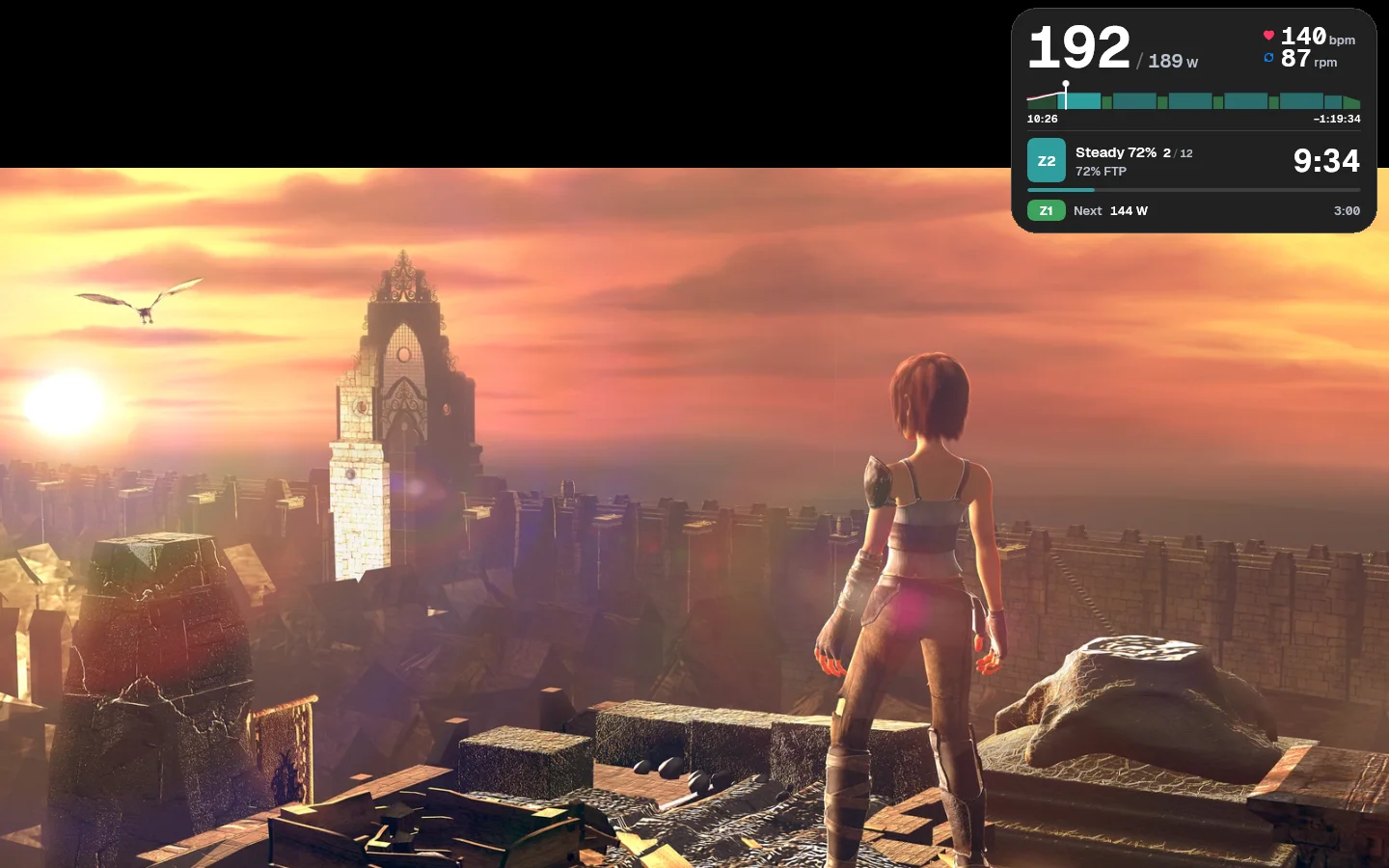
To watch a film while you ride indoors, start your workout in hupser on your Mac or Windows PC, then play the film in any app. hupser keeps your power, heart rate, cadence and the workout in a small overlay on top, and runs the workout behind the film: in ERG, your trainer still goes to each interval's watts. It's for long endurance rides, easy spins and anyone who'd rather watch a race than the wall.
Watch a film during a hupser workout
hupser's overlay comes up by itself whenever another app is in front:
- Start your workout in hupser.
- Open your film in any app: a browser, a video player or a streaming app.
- Make the film full screen if you like. hupser's overlay stays on top of it.
- To see the whole ride screen again, switch back to hupser.
Notch, Top or Corner
hupser's overlay has two layouts. Notch on a Mac and Top on Windows is the default: a slim strip at the top centre of the screen, with heart rate and cadence on one side and the step's zone, its time left and your power on the other. On a MacBook it sits beside the camera, at the notch's own height, so a full-screen film starts just below it. Point at its middle and it opens with the workout chart. Over its sides it fades out, so the menu bar, title bars and tabs under it keep working.
Corner is a card you can put anywhere on the screen, in one of two styles:
- Normal: power over the target with heart rate and cadence, the workout chart with ride times, the current step and the next one.
- Compact: power against the target and the step's countdown in large type, the workout chart, then heart rate, cadence and ride time left on one line. In a step's last 15 seconds it shows the next one.
Power on the overlay is a 3-second average, so the number doesn't jump around every second. When the ride pauses or the trainer drops out, the overlay says Ride paused or Trainer disconnected, and the workout's cues show on it too.
Set up the overlay
hupser's overlay panel opens from its icon: in the menu bar on a Mac, in the tray by the clock on Windows. It shows your ride at a glance, then Corner, Notch (Top on Windows) and Off.
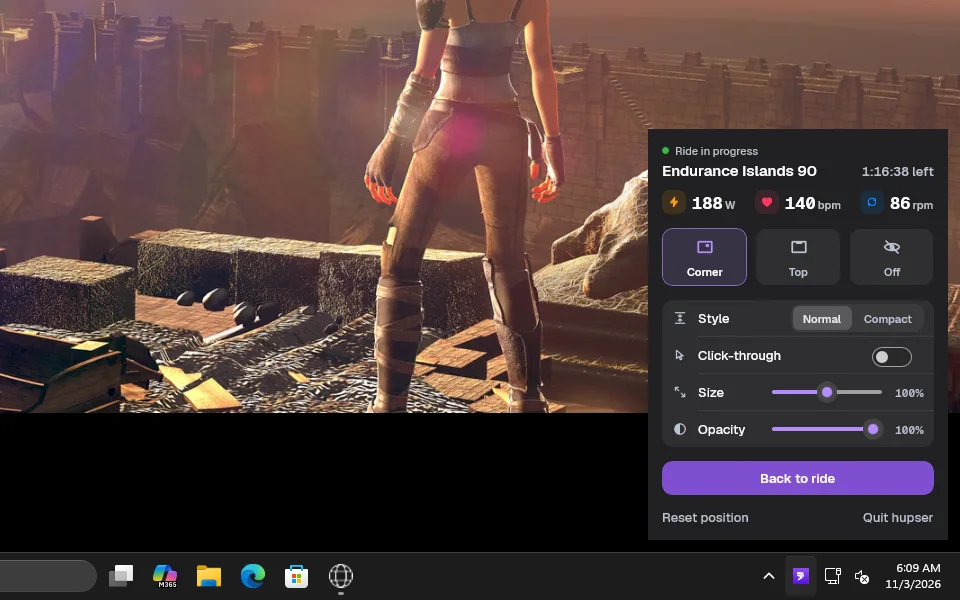
With Corner picked, it adds:
- Style: Normal or Compact.
- Click-through: your clicks go to the app under the overlay. Turn it off to drag the overlay somewhere else. It stays where you leave it, and Reset position puts it back in the top-right corner.
- Size: 60 to 140%.
- Opacity: 65 to 100%.
With two screens or more, Display puts the overlay on the one you watch, such as a TV. The overlay stays up while the panel is open, so you see each change as you make it. Notch and Top are always solid and click-through.
Your workout keeps going behind the film
hupser runs your workout whatever app is in front: in ERG, your trainer goes to each interval's watts, and every second of the ride is recorded. On Windows, closing hupser's window keeps the ride going; click the tray icon and choose Back to ride to see it again.
The interval countdown and the start, pause and finish sounds play over your film, and the film keeps playing. Settings → Sound sets their volume or turns them off.
If you don't see the overlay
- The overlay shows only during a ride, and only while another app is in front: in hupser itself, the ride screen shows it all. Without a ride, the panel says No ride in progress.
- Off may be picked in the panel: pick Notch, Top or Corner.
- To find a corner overlay you've lost, choose Reset position in the panel.
- On Windows, hupser's icon may be behind the Show hidden icons arrow next to the clock.
Questions
Can I watch Netflix or YouTube while I ride with hupser?
Yes. On Mac and Windows, start your workout in hupser, then play the film or video in any app or browser, full screen if you like. hupser keeps your power, heart rate and workout in a small overlay on top.
Does my workout keep running when hupser isn't in front?
Yes. hupser runs the workout while you watch: in ERG, your trainer goes to each interval's watts, and the whole ride is recorded.
Can I move the overlay or make it smaller?
Pick Corner in hupser's overlay panel, turn Click-through off and drag the overlay where you want it; it stays there. Size sets it from 60 to 140%, and the Compact style takes less room.
Can I show my ride numbers on my TV?
Yes, if the TV is a second screen for your Mac or PC: choose it under Display in hupser's overlay panel, and the overlay shows on the TV over your film.
Will hupser's sounds play over my film?
Yes. The interval countdown and the start, pause and finish sounds play over it, and the film keeps playing. In hupser, Settings → Sound sets their volume or turns them off.
Is the overlay on iPhone and iPad?
No. hupser's ride overlay is on Mac and Windows.